Agentic Memory & Long-Term Persistence
Article text.
What people usually mean by “agent memory”
In most agent stacks, permanent (or long‑term) memory means state that survives after the current chat or run and is loaded again later so the agent can behave as if it “remembers.”
Typical examples:
User / session facts (preferences, standing instructions)
Episodic memory (what happened in past tasks)
Learned rules distilled from past interactions
It is usually stored in a database, vector store, or files, then retrieved and injected into prompts or tool context on future requests. That is distinct from short‑term memory (only this turn / this run) and from static knowledge (RAG documents you curated).
Does the Metronisys solution have something similar?
Yes, in a few forms;1. Mem0 “persona” long‑term memory (optional) The codebase has an explicit long‑term, persisted layer in mem0_layer.py: Mem0 with Chroma on disk (mem0_persona collection, path under agent_os_root / METRONISYS_MEM0_PERSIST_PATH). It exposes:
add_to_long_term_memory — store sanitized “lessons” keyed by user_id=agent_id with metadata (e.g. department for IAM-style filtering). recall_behavioral_context — semantic search over that store for behavioral context to inject into later runs. It is off by default (METRONISYS_MEM0_ENABLED defaults to false; requires the mem0ai package per comments in code). When enabled, run_sub_agent calls recall_behavioral_context and passes the result as mem0_context into answer_with_ollama so the LLM can use remembered preferences/lessons. close_project can feed mem0_add_func so closing a project can append to this long‑term store after sanitization.
That is the feature that most directly parallels “permanent agent memory” in the usual sense.
2. RAG / Chroma (persistent knowledge, not the same as “memory”) RAG over policy folders is persistent retrieval from documents you control. It behaves like a knowledge base, not like learned episodic memory from past chats (unless you treat ingested docs as “memory” colloquially).
3. MemoryManager (mostly run-scoped; optional encrypted store) MemoryManager combines ephemeral memory with an optional SecureStore for persistence. In practice it is used for things like session snapshots for human‑approval resume (snapshot_session / restore_session), i.e. workflow continuity, not a general “the agent remembers everything forever” product feature.
4. Other persistence Supervisor/workflow checkpoints — durable multi‑step run state. memory_archiver — archives workflow outputs (e.g. article JSON/HTML) to disk; artifact / deliverable storage, not conversational memory. clear_session_memory — clears short‑term session context (explicitly not permanent memory). Bottom line: The solution does include a similar concept to “permanent agent memory” via optional Mem0-backed long‑term persona memory (add on project close / recall in sub-agent). Everything else is either RAG knowledge, run/session mechanics, or artifact archiving, which overlap in name but serve different roles.
Mem0
Where the data is stored?With METRONISYS_MEM0_ENABLED=true, Mem0 uses a local Chroma vector store on disk.
Default directory:
mem0_persist_path = METRONISYS_MEM0_PERSIST_PATH if set,
otherwise {METRONISYS_AGENT_OS_ROOT}/mem0_persona
agent_os_root defaults to {METRONISYS_EVIDENCE_OUTPUT}/agent_os if METRONISYS_AGENT_OS_ROOT is not set.
evidence_output defaults to the project’s evidence_output folder if METRONISYS_EVIDENCE_OUTPUT is not set.
So on a typical setup you get something like:
unless you override any of those env vars.
Inside that folder, Mem0/Chroma write binary persistence (SQLite + Chroma data for collection mem0_persona — see mem0_layer.py). That path is not meant to be read as plain text; it is the backing store for the Mem0 library.
How to “view” the memory
There is a built-in portal page which that lists the logged in user Mem0 entries for browsing. Alternatives:1. Mem0 Python API (get_all) - closest to “show everything” The maintenance code uses the same store and calls mem.get_all(user_id=agent_id, filters=...) to load all memories for an agent before consolidation (memory_maintenance.py). You can do the same in a short script/notebook: initialize Memory with the same config as mem0_layer (same persist path, collection name, embedder), then call get_all for your user_id (that is the agent_id used when adding memories).
2. recall_behavioral_context - what the app actually “sees” At runtime, the sub-agent does not dump the full store; it runs recall_behavioral_context(agent_id, query, filters=..., limit=5), which returns the top matching snippets for the current query. So “memory as used in chat” is semantic retrieval, not a full history listing.
3. Maintenance script metronisys/scripts/run_memory_maintenance.py with --mem0 runs consolidation (read all → LLM merge → replace), not a passive viewer. It still proves the data is in the store and prints a result message; it does not replace a read-only inspector UI.
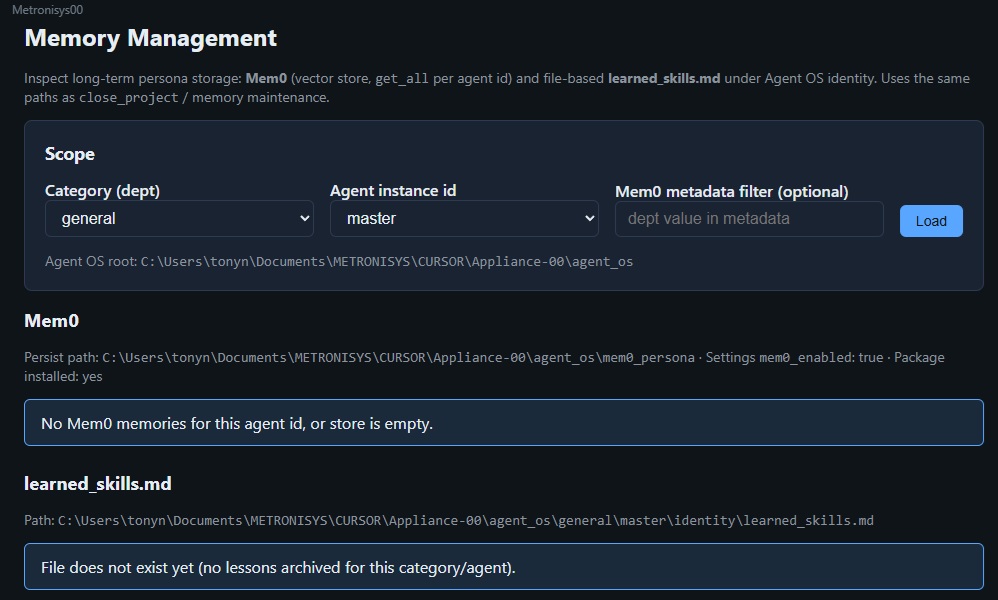
Metronisys mem0 Manager Portal Page
4. Raw folder
Opening mem0_persona in a file manager only shows Chroma/SQLite files. To interpret them you normally use Mem0 or Chroma APIs, not a text editor.
Related: not the same store
There is also separate file-based persona maintenance (learned_skills.md in run_maintenance when cleanup_file=True), learned_skills.md is only updated when AgentOS close_project is executed — that is another persistence path from the maintenance subsystem, not the Chroma Mem0 blob unless your deployment ties them together in docs you add.
Practical takeaway: With Mem0 on, data lives under METRONISYS_MEM0_PERSIST_PATH or …/agent_os/mem0_persona. To view contents in a meaningful way, use Memory.get_all(...) (as per the dedicated Portal Page) or rely on recall_behavioral_context to see what would be injected for a given query.